Christian Ziemski's
wikidPad Page
The todo-extension
Files to download
The current stable version (2011-06-06): ToDoExtension.py.
I'm handling my development files with Mercurial, a free, distributed source control management tool.
For remote access and public download there is my repository on Bitbucket.
So all files, including the history, are available there as well:
- The current stable version (2011-06-06): ToDoExtension.py.
-
The development (beta) version: ToDoExtension.py (beta) with
- improved filter handling:
For example: Now a page "ToDo_Done_Sometext" would show all "done" todos with "Sometext" in tag
- a new option "filterTodos=3" for searching in page names too (suggested by osmill).
Comments, suggestions and bug reports are welcome and can be placed in wikidPad Yahoo! Group
How it evolved
While trying wikidPad as ToDo-List-Helper I found the following extensions on the wikidPad Project Home Page:
- GettingThingsDone (The starting point)
- 'NextActions' by Eric Neumann
- Enhanced by icosahedral to organize by context instead of by project name.
- SortedTodos
- JaysenNaidoo version to sort the page according to tags (todo.<tag>:)
- Mike Crowe added dynamic tags
Because these extensions still didn't exactly fit my needs I wrote my own, loosely based on the above.
I mainly added date calculations, date sorting, a separate calendar page and a configuration section.
(The formulas for 'date calculation from week number' I found somewhere in the WWW (link to be added later here).)
Description
If a wikiWord beginning with "ToDo" is created or selected (viewed) it automatically
collects all 'todo' entries from all other pages and inserts them here (after a placemark).
Of course you can write your own text before that placemark. It wouldn't be touched by the extension.
If the wikiWord has additional characters after the "ToDo" like "ToDoPrivate" those characters "Private"
are used as filter (case insensitive).
If there are spaces or underlines between "ToDo" and the following characters (e.g "ToDo_Private")
these are ignored and so still the filter is "Private". (This may be better readable.)
Only Todos containing that filter string (in its name or in the full entry) are collected.
(Behavior depends on configuration option "filterTodos" below.)
Note: If the optional Calendar feature is enabled, it is "ToDoCalendar" and "ToDoCalendarPrivate" in the example below.
The todos are sorted by 'tag' the following way:
    1.) Completely untagged                                e.g. 'todo: shopping'

    2.) Tagged with special tags.                          e.g. 'todo.High: pay taxes'
      Sort order and display see config section below

    3.) Tagged with a date                                 e.g. 'todo.2006-10-31: Halloween 2006'
      Sorted by date (earliest first in list)
      Marked as 'GONE', 'TODAY', 'n hours left', 'n days left' dependent on dayrange below
      Displayed in different formats, dependent the same way.

      The following date formats are recognized:       (**) = new as of 2010-01-10   (***) = new as of 2010-12-07

          "yyyy-mm-dd"   # standard date                               e.g. todo.2006-10-31: Halloween 2006
          "mm/dd/yyyy"   # GB/US date
          "dd.mm.yyyy"   # European date
          "yyyy-mm-*"    # complete month mm (every day) of year yyyy  e.g. todo.2010-07-*:  One month for summer vacations   (**)
          "*-mm-*"       # complete month mm (every day); every year   e.g. todo.*-12-*:     Buy Christmas gifts   (**)
          "yyyy-Wnn-d"   # DayOfWeek in given week+year (Mon=1,Sun=7)  e.g. todo.2007-W03-2: Tuesday of 3rd week in 2007
          "*-W*-d"       # DayOfWeek in every week+year (Mon=1,Sun=7)  e.g. todo.*-W*-1:     go to work on Monday
          "yyyy-Wnn"     # complete week in a given year               e.g. todo.2008-W12:   complete week 12 in 2008
          "*-Wnn"        # complete week, every year                   e.g. todo.*-W52:      prepare end of year
          "CWnn"         #   same as above: Calendar Week
          "KWnn"         #   same as above: Calendar Week (German: Kalender Woche)
          "*-mm-dd"      # a date every year                           e.g. todo.*-10-31:    Halloween, in every year
          "*-*-dd"       # a day every month, every year               e.g. todo.*-*-01:     Every month, the 1st day
          "*-*-*"        # every day
          "*-mm-dd+d"    # every DayOfWeek before(-)/after(+) dd'th day of month mm   (**)
          "*-*-dd+d"     # every DayOfWeek before(-)/after(+) dd'th day every month   e.g.  todo.*-*-31-1: Monthly report (last Monday of the month)   (**)
          "*-E+ddd"      # Easter +- ddd days  (***)

      The dates with "*" are "optimistic" ones: if such a date is in the past
      it is assumed as "for next year" and not as "GONE this year".

          If there are subtags like the string "Peter" in "todo.Peter.2008-09-16: Birthday" the subtag is listed in parentheses on the todo page.

    4.) otherwise tagged                                       e.g. 'todo.family: holidays'
Note: Within the wikidPad help wiki this hook does nothing, even if you create a page ToDo there.
The following WikiDocumentAttributes will be added to that generated page
(If there isn't already a custom [icon: ...] set, see configuration below):
- [icon: spanner]
- [color: magenta]
- [bookmarked=true]
Example
Since a few pictures are able to describe better than many words here an easy example.
(The hardcopies are taken from WikidPad 1.9 running under Linux/KDE.)
Imagine a Wiki with two wiki pages "CarAndMore" and "FamilyBusiness" with some data and todo tags on it:
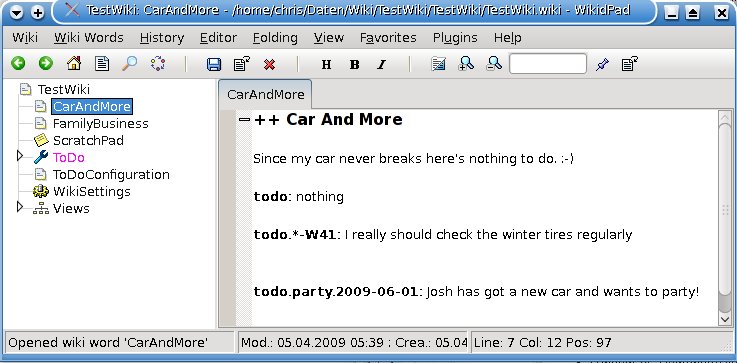
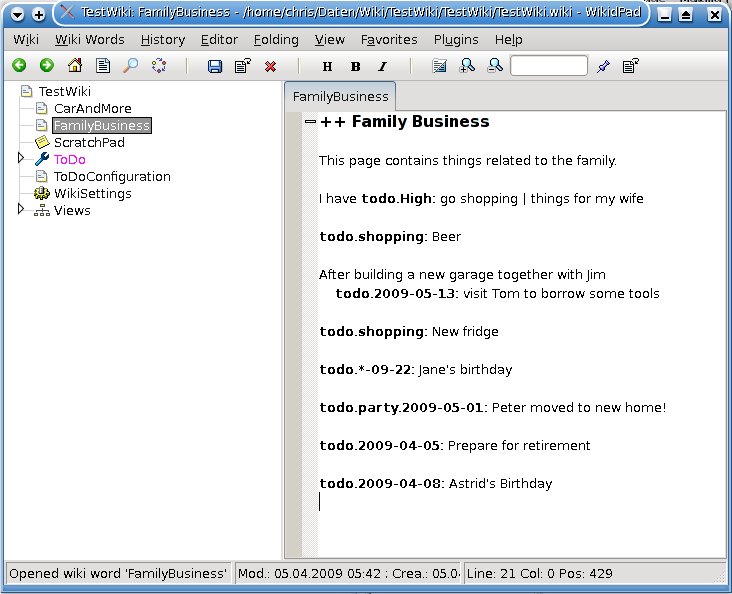
Opening the wiki page "ToDo" now shows an info popup:
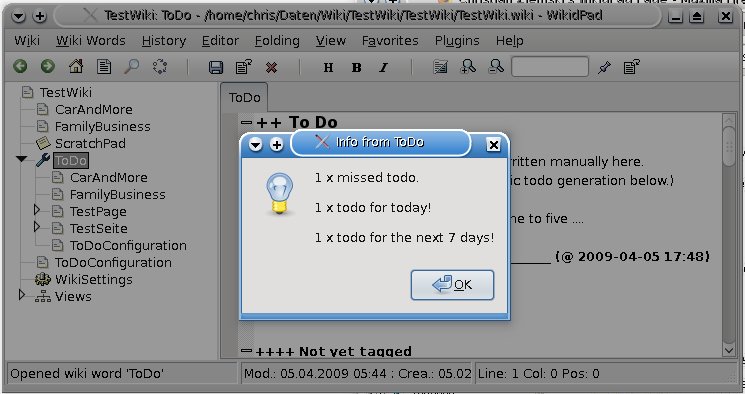
and then in edit mode:
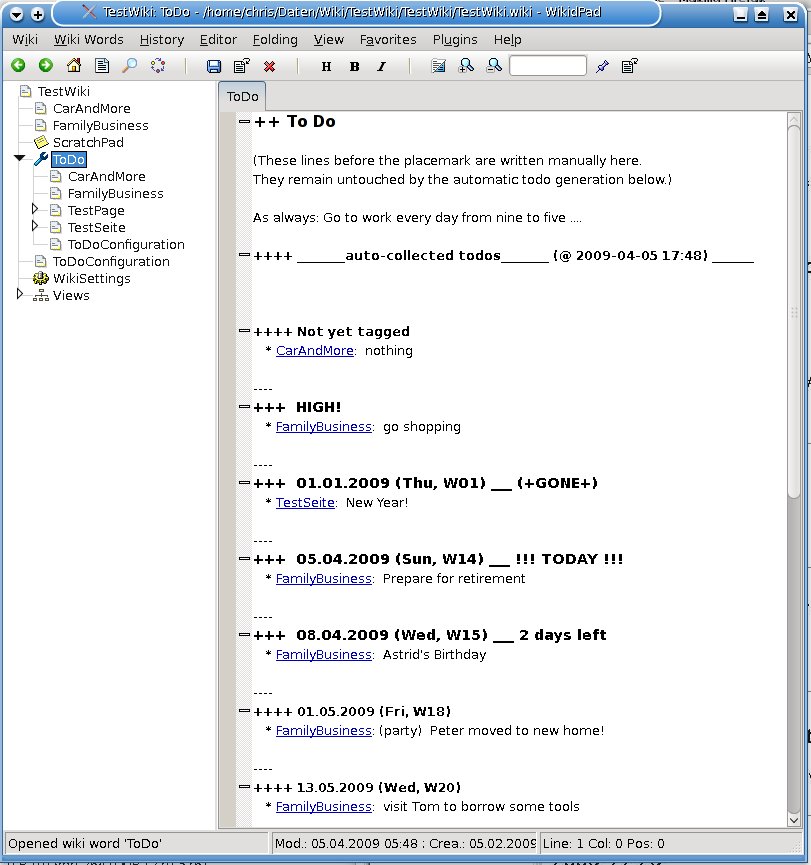
The same in preview mode:
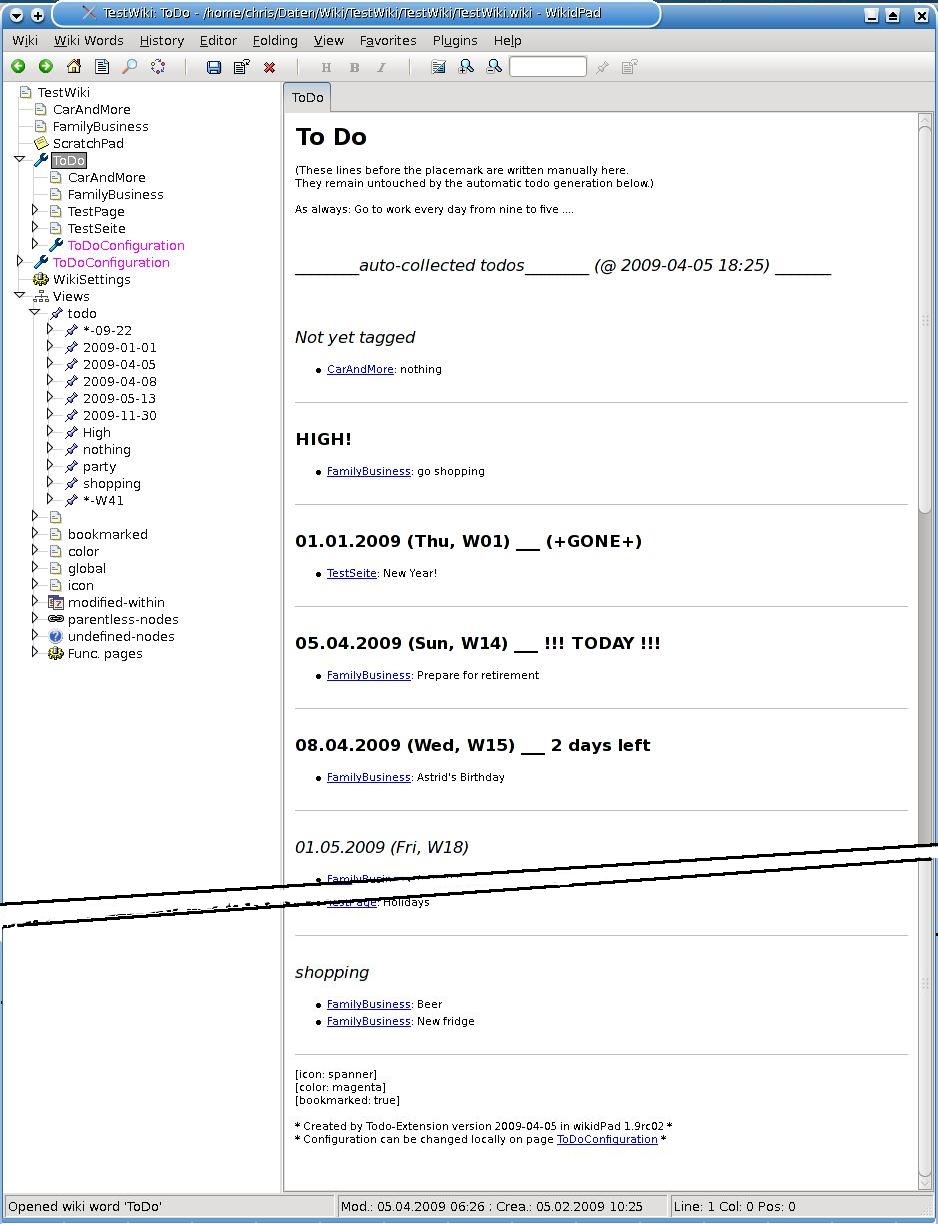
(In the standard lefthand tree view 'todo' the todo items are sorted alphabetically, on the ToDo page to the right they are sorted by date and/or tag.)
Configuration (optional)
The extension is configurable in three levels.
- Within the code there is a configuration section with default values.
Don't change them there since they will be overwritten by the next update of this program.
The following configuration value 'predefinedTags' is the only one only changeable in the code itself, if you really want.
predefinedTags contains (Tag, TagHeader).
TagHeaders are the descriptive headings that will be shown for each category.
Tag 'UNTAGGED' is a special one (mandantory!) to collect the untagged todo's.
'predefinedTags', [
                ('UNTAGGED',     '++++ Not yet tagged'),
                ('High',         '+++  HIGH!'),
                ('Next',         '++++ Next Actions'),
                ('ThisWeek',     '++++ This Week'),
                ('SomeDay',      '++++ SomeDay / Maybe'),
                ('TimeToTime',   '++++ From time to time'),
                ('Low',          '++++ Tagged as LOW'),
                ('VeryLow',      '++++ Tagged as Very LOW') ],
- As of 2008-02-24 there is an (optional) configuration file ToDoExtension.cfg in the same directory user_extensions as the extension itself.
(In April 2009 the syntax changed a bit.)
Simply set config values in that file using the normal Python syntax: 'name = value'
Please note: Multiline entries aren't supported yet. So for example 'predefinedTags' can't be changed that way.
If you are maintaining your local configuration changes in that file they aren't overwritten any more.
This makes code updates much easier.
Please have a look at the example file ToDoExtension.cfg.example.
It contains all changeable configuration values.
(If you want to use that file for your installation you have to rename it to ToDoExtension.cfg of course.)
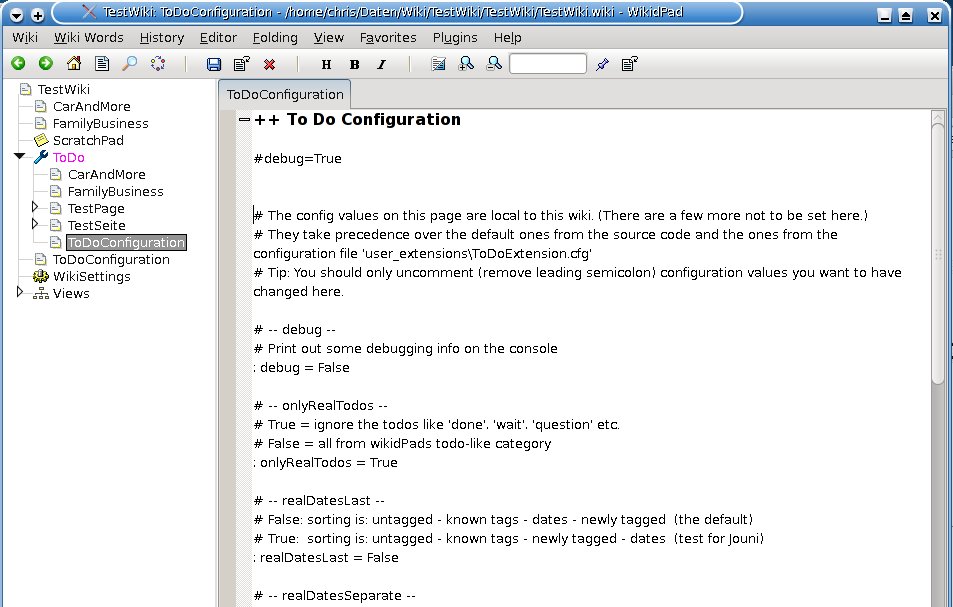
- As of 2009-04-05 there is an additional (optional) local configuration per wiki.
It can be filled with values on the wiki page 'ToDoConfiguration'.
The syntax is the same as in the config file above.
If the wiki page 'ToDoConfiguration' has no active configuration entries on opening
the extension offers to fill it with the current values as template (all commented out).
Please note: The config values 'predefinedTags', 'isConfigPageActive' and 'configPage' can't be changed on this wiki page.
On every opening of the page ToDoConfiguration a reminder will pop up...
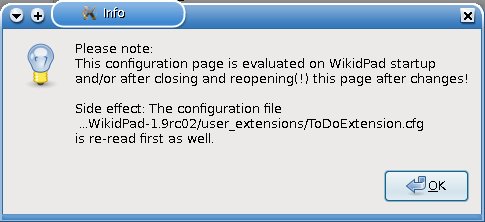
... just before the page itself is shown:
Installation
- Create a directory user_extensions under your wikidPad directory parallel to ('icons', 'extensions', 'export' etc.) (if it doesn't already exist)
- Place the ToDoExtension.py into that directory user_extensions
- Optional: Create or change ToDoExtension.cfg there. (Read about it above.)
- Restart wikidPad to activate the changes
Known issues
- The automatic determination of the (locale) date format for list output doesn't work on Windows. Fallback is YYYY-MM-DD.
Planned changes/features
- Internal rewrite to make the extension better readable and maintainable [already working on it]
- Automatc refresh of ToDo page (suggested by Christopher Bielenko and others)
- Even more error checking
- Sort of help page
- Integration of statistics about todos as suggested/provided by Chris D.
Features to think about
- Something like tags in blogs (suggested by Christopher Bielenko)
Jaysen Naidoo has already created such an extension: TagView
- Something with "done" items
- Drop support for ancient WikidPad versions